
Active
Self-updating
fishy.moe's own client
Important
 Noted by hinamizawa: This client is fishy.moe's own. Aeris is maintained by Hinamizawa and distributed from fishy.moe, with its own live update server, so every install keeps itself current. TheFantasticLoki is its lead developer, currently on break. The old Kawata download URL (
Since June 27, 2026, fishy.moe has hosted Aeris, now its official home, and it is fully available at fishy.moe/download/aeris.
Noted by hinamizawa: This client is fishy.moe's own. Aeris is maintained by Hinamizawa and distributed from fishy.moe, with its own live update server, so every install keeps itself current. TheFantasticLoki is its lead developer, currently on break. The old Kawata download URL (storage.kawata.pw) remains offline.storage.kawata.pw has been down since June 2, 2026.Since June 27, 2026, fishy.moe has hosted Aeris, now its official home, and it is fully available at fishy.moe/download/aeris.
Active beta with modernized Skooter AC, Relax, Timewarp, and Aim Assist beta features.
- Status: Active (hosted on fishy.moe) · fishy.moe's own client, maintained by Hinamizawa · Public beta · Free
- History Preview: fishy.moe/kawata-aeris
- Maintainer: Hinamizawa (current maintainer; originally developer
 Panini Céleste;
  TheFantasticLoki (lead developer, on break),
  Maple Syrup/MrFlashStudio, Chewy/Pythr and
  noemi contributed to the project)
 - Download:
- fishy.moe: fishy.moe/download/aeris (hosted on fishy.moe)
- Official: storage.kawata.pw (former Kawata host, offline since June 2026)
- Discord: discord.gg/pu5zCBfMhZ
- Virus analysis: Hybrid Analysis report
- Cheats:
- Aim Correction (improved Skooter AC, optional Tap-on-Correct for non-RX, relative range support)
- Relax Hack (SkooterRX Improved)
- Timewarp (rate & multiplier)
- Automatic CS Changer · AR Changer · HD Remover · FL Remover
- Beta features:
- Maple Aim Assist V1 + V2 (submitting); V3 and L-V1 not submitting
- Dedicated input thread (aim only, 1/2/4/8/16K FPS options)
- Dev features:
- Dev version has been updated to 64-bit and modern .NET 8.
- Slightly better Windows integration for shortcuts and notifications.
- Can run more stably and smoothly depending on the system.
- Very experimental; performance is not guaranteed and depends on the system.
Note
Noted by hinamizawa: Good news first: Aeris updates itself. Every time you launch it, the client checks fishy.moe and quietly pulls only the files that changed, so a new build lands on its own. You never re-download or reinstall for a normal update.
Coming from an older Aeris and it will not start, or your maps will not load after you switch? That is a one-time reset, not something you repeat. An old install can hold files that no longer match the current build, so clear them once and rebuild a clean set. Back up your
One heads-up so you do not panic: right after the reinstall your maps can briefly show as missing. They are not gone. Restart osu! once and they come back.
Noted by hinamizawa: Good news first: Aeris updates itself. Every time you launch it, the client checks fishy.moe and quietly pulls only the files that changed, so a new build lands on its own. You never re-download or reinstall for a normal update.Coming from an older Aeris and it will not start, or your maps will not load after you switch? That is a one-time reset, not something you repeat. An old install can hold files that no longer match the current build, so clear them once and rebuild a clean set. Back up your
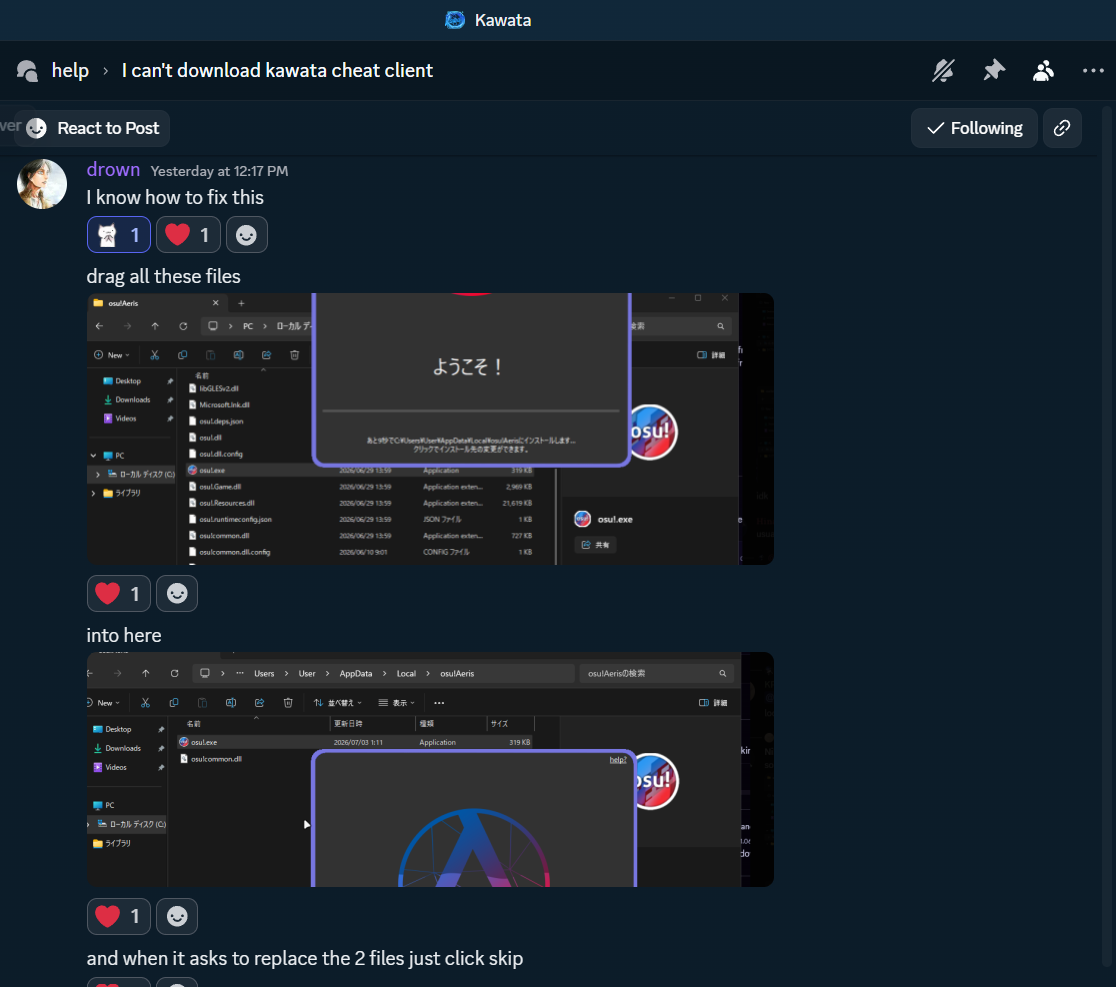
%LocalAppData%\osu!Aeris\ folder first (copy it somewhere safe), then close osu!Aeris and, from that folder, delete only these client program files: osu!.exe, osu!.dll, osu!.Game.dll, osu!.Resources.dll, osu!common.dll, libGLESv2.dll, Microsoft.Ink.dll, and their matching .json / .config files (the same set listed in the fix below). Leave everything else, and do not touch your Songs (your maps), your scores, or your skins, or your error and log text files. Then run the osu!AerisSetup installer again, or redownload it from fishy.moe/download/aeris if you no longer have it, and it rebuilds a clean client. After this one time, updates go back to being automatic.One heads-up so you do not panic: right after the reinstall your maps can briefly show as missing. They are not gone. Restart osu! once and they come back.
Fix for Aeris still failing after antivirus exclusion
Per the Kawata Discord
help channel (fix documented by drown): if excluding the install folder still doesn't fix it, drag libGLESv2.dll, Microsoft.Ink.dll, osu!.deps.json, osu!.dll, osu!.dll.config, osu!.exe, osu!.Game.dll, osu!.Resources.dll, osu!.runtimeconfig.json, osu!common.dll, and osu!common.dll.config into %LocalAppData%\osu!Aeris\, and click Skip if it asks to replace 2 files.